> ## Documentation Index
> Fetch the complete documentation index at: https://about.sendforsign.com/llms.txt
> Use this file to discover all available pages before exploring further.
# 2025
> What's new in Sendforsign
## 1 October
### Dynamic Tables
We've introduced dynamic tables that can be easily created and updated through a single API call. Transform any placeholder in your HTML documents into a fully functional table with just one request.
New features:
* Convert any existing placeholder into a dynamic table
* Define table structure (columns and rows) via API
* Update table content programmatically using `/placeholder/update-table`
* Tables are automatically rendered in the document editor with full editing capabilities
[Learn more about dynamic tables](/api-reference/placeholder/update-table)
## 15 July
### New Editor with Enhanced Capabilities
We've released a brand new editor with a comprehensive set of formatting and editing tools. The new editor brings powerful features to help you create and edit documents with greater ease and flexibility.
New features:
* Rich text formatting options: bold, italic, underline, strikethrough
* Font selection and size control
* Text colors and highlighting
* Text alignment (left, center, right, justify)
* Multiple list types: numbered, bulleted, and checkbox lists
* Superscript and subscript
* Indentation controls
* Insert images, tables, links, and code blocks
* Quote blocks and horizontal dividers
* Undo/redo and clear formatting
## 10 April
### Cursor-like editor
New Components Version:
* `"sendforsign": "1.1.29"`
New features:
* Now you can ask questions about agreements, modify their content, chat with any document, and apply changes in one click using Sendforsign's AI.
## 15 January
### Introducing Legal AI Agent
🔹 E-signatures made contracts digital, but they didn't make them easy.
There's still way too much friction:
* Creating document templates is a pain.
* Filling out the same info over and over? Annoying.
* Fixing errors? Messy.
* Understanding complex legal terms? Feels like you need a law degree.
* Integrating with other software? Ugh.
💡 So we asked: what if AI+API could fix all of this?
That's why we ended up with an API-first approach empowered by AI capabilities.
Today we're introducing the ability to speed up the contract creation process with AI that understands your templates and company data.
 ### Dynamic Tables
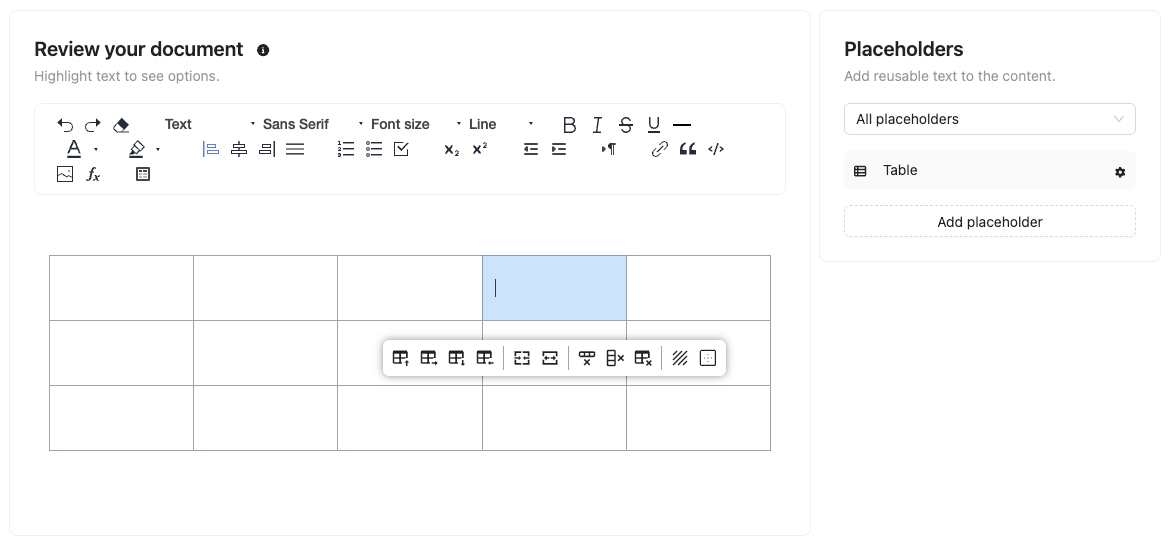
We've introduced dynamic tables that can be easily created and updated through a single API call. Transform any placeholder in your HTML documents into a fully functional table with just one request.
New features:
* Convert any existing placeholder into a dynamic table
* Define table structure (columns and rows) via API
* Update table content programmatically using `/placeholder/update-table`
* Tables are automatically rendered in the document editor with full editing capabilities
[Learn more about dynamic tables](/api-reference/placeholder/update-table)
## 15 July
### Dynamic Tables
We've introduced dynamic tables that can be easily created and updated through a single API call. Transform any placeholder in your HTML documents into a fully functional table with just one request.
New features:
* Convert any existing placeholder into a dynamic table
* Define table structure (columns and rows) via API
* Update table content programmatically using `/placeholder/update-table`
* Tables are automatically rendered in the document editor with full editing capabilities
[Learn more about dynamic tables](/api-reference/placeholder/update-table)
## 15 July
 ### New Editor with Enhanced Capabilities
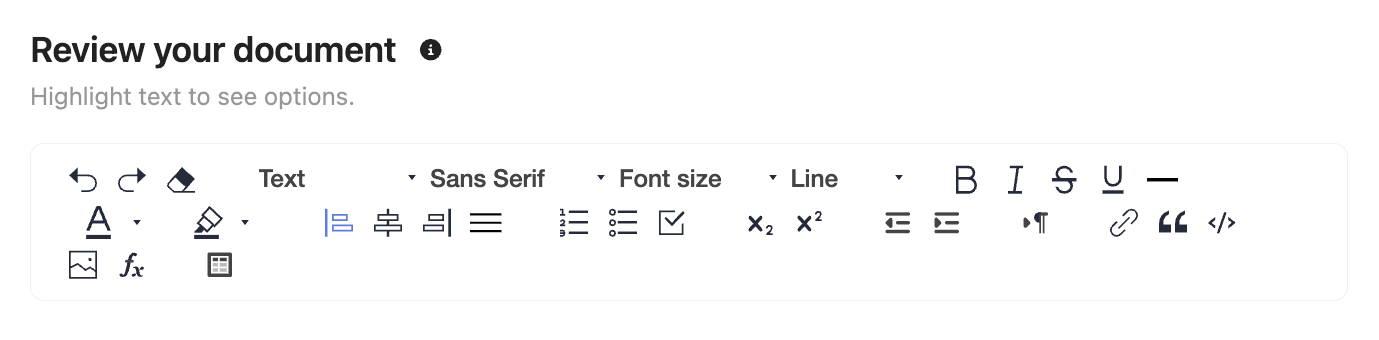
We've released a brand new editor with a comprehensive set of formatting and editing tools. The new editor brings powerful features to help you create and edit documents with greater ease and flexibility.
New features:
* Rich text formatting options: bold, italic, underline, strikethrough
* Font selection and size control
* Text colors and highlighting
* Text alignment (left, center, right, justify)
* Multiple list types: numbered, bulleted, and checkbox lists
* Superscript and subscript
* Indentation controls
* Insert images, tables, links, and code blocks
* Quote blocks and horizontal dividers
* Undo/redo and clear formatting
## 10 April
### New Editor with Enhanced Capabilities
We've released a brand new editor with a comprehensive set of formatting and editing tools. The new editor brings powerful features to help you create and edit documents with greater ease and flexibility.
New features:
* Rich text formatting options: bold, italic, underline, strikethrough
* Font selection and size control
* Text colors and highlighting
* Text alignment (left, center, right, justify)
* Multiple list types: numbered, bulleted, and checkbox lists
* Superscript and subscript
* Indentation controls
* Insert images, tables, links, and code blocks
* Quote blocks and horizontal dividers
* Undo/redo and clear formatting
## 10 April
 ### Cursor-like editor
New Components Version:
* `"sendforsign": "1.1.29"`
New features:
* Now you can ask questions about agreements, modify their content, chat with any document, and apply changes in one click using Sendforsign's AI.
## 15 January
### Cursor-like editor
New Components Version:
* `"sendforsign": "1.1.29"`
New features:
* Now you can ask questions about agreements, modify their content, chat with any document, and apply changes in one click using Sendforsign's AI.
## 15 January
 ### Introducing Legal AI Agent
🔹 E-signatures made contracts digital, but they didn't make them easy.
There's still way too much friction:
* Creating document templates is a pain.
* Filling out the same info over and over? Annoying.
* Fixing errors? Messy.
* Understanding complex legal terms? Feels like you need a law degree.
* Integrating with other software? Ugh.
💡 So we asked: what if AI+API could fix all of this?
That's why we ended up with an API-first approach empowered by AI capabilities.
Today we're introducing the ability to speed up the contract creation process with AI that understands your templates and company data.
### Introducing Legal AI Agent
🔹 E-signatures made contracts digital, but they didn't make them easy.
There's still way too much friction:
* Creating document templates is a pain.
* Filling out the same info over and over? Annoying.
* Fixing errors? Messy.
* Understanding complex legal terms? Feels like you need a law degree.
* Integrating with other software? Ugh.
💡 So we asked: what if AI+API could fix all of this?
That's why we ended up with an API-first approach empowered by AI capabilities.
Today we're introducing the ability to speed up the contract creation process with AI that understands your templates and company data.